
9 Client dashboard examples for reporting & client portals (+ tips)
Dashboards range from analytics to client portals. After testing dozens, here are 9 client dashboard examples across marketing and service delivery in 2026.


After reviewing dozens of dashboards across agencies and service businesses, I found 9 client dashboard examples that show what works for marketing analytics versus service delivery. Here's what each does, which features to look for when selecting tools, and practical tips for designing your own.
What is a client dashboard?
A client dashboard is a digital interface that displays important information about projects, campaigns, or services in one centralized location.
Most people mean one of two things when they talk about client dashboards:
- Client reporting dashboards show results and metrics. You'll see campaign performance data like website traffic, conversion rates, ad spend, and ROI. Marketing agencies use these to track how campaigns perform across channels like Google Ads, Facebook, or email.
- Client portal dashboards provide a workspace for service delivery and communication. These show project status, shared files, messages, invoices, and task lists. Consultants, accountants, and agencies use them to give clients a branded space where they can access everything related to their account.
Many platforms blend both approaches. You might see performance metrics alongside project updates and client communication in the same dashboard. The examples below cover both types so you can see what each does well and which fits your business needs.
9 Client dashboard examples for reporting and portals
The examples below show how businesses use dashboards to track marketing performance and manage client relationships. The first five focus on campaign analytics and reporting, and the last four handle service delivery, project management, and client communication.
Here are 9 client dashboard examples that cover both categories:
Client reporting dashboard examples
Reporting dashboards often focus on marketing and look at campaign performance and data analytics. Agencies use them to report metrics like traffic, conversions, and return on investment (ROI) to their clients.
Here are some examples of client reporting dashboards about marketing:
1. Cross-channel performance dashboard
A cross-channel dashboard pulls data from all your marketing platforms into one view. You can see Google Ads, Facebook campaigns, email marketing, and organic search results side by side.
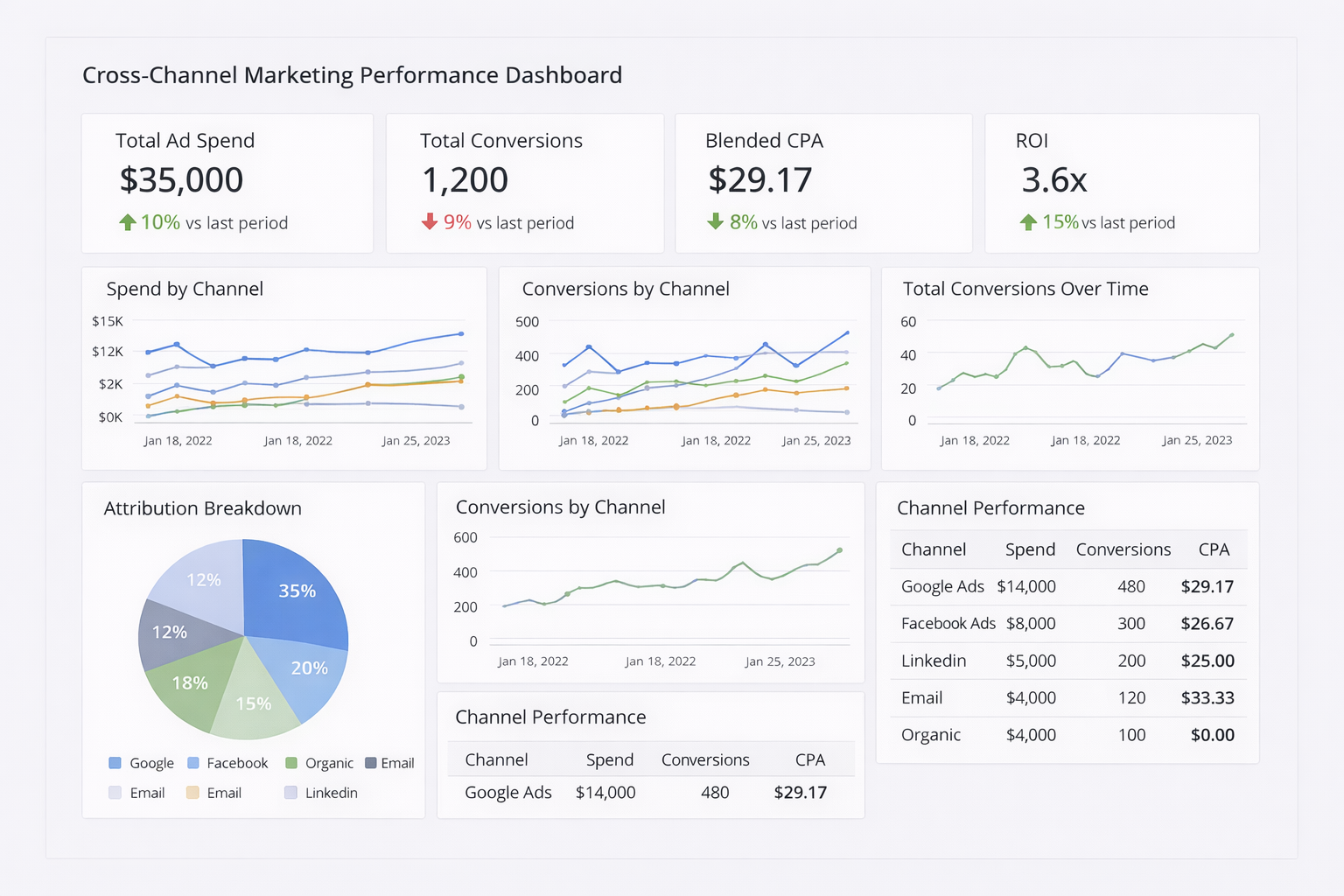
This dashboard shows total spending across channels. It also tracks conversions by source, cost per acquisition, and overall ROI. For example, when you see e-mail costs $33.33 per lead while Facebook Ads cost $26.67, you know where to invest more.
2. Social media dashboard
Social media dashboards track performance across platforms like Facebook, Instagram, LinkedIn, and TikTok. You'll see follower growth, engagement rates, post reach, and click-through rates in one place.
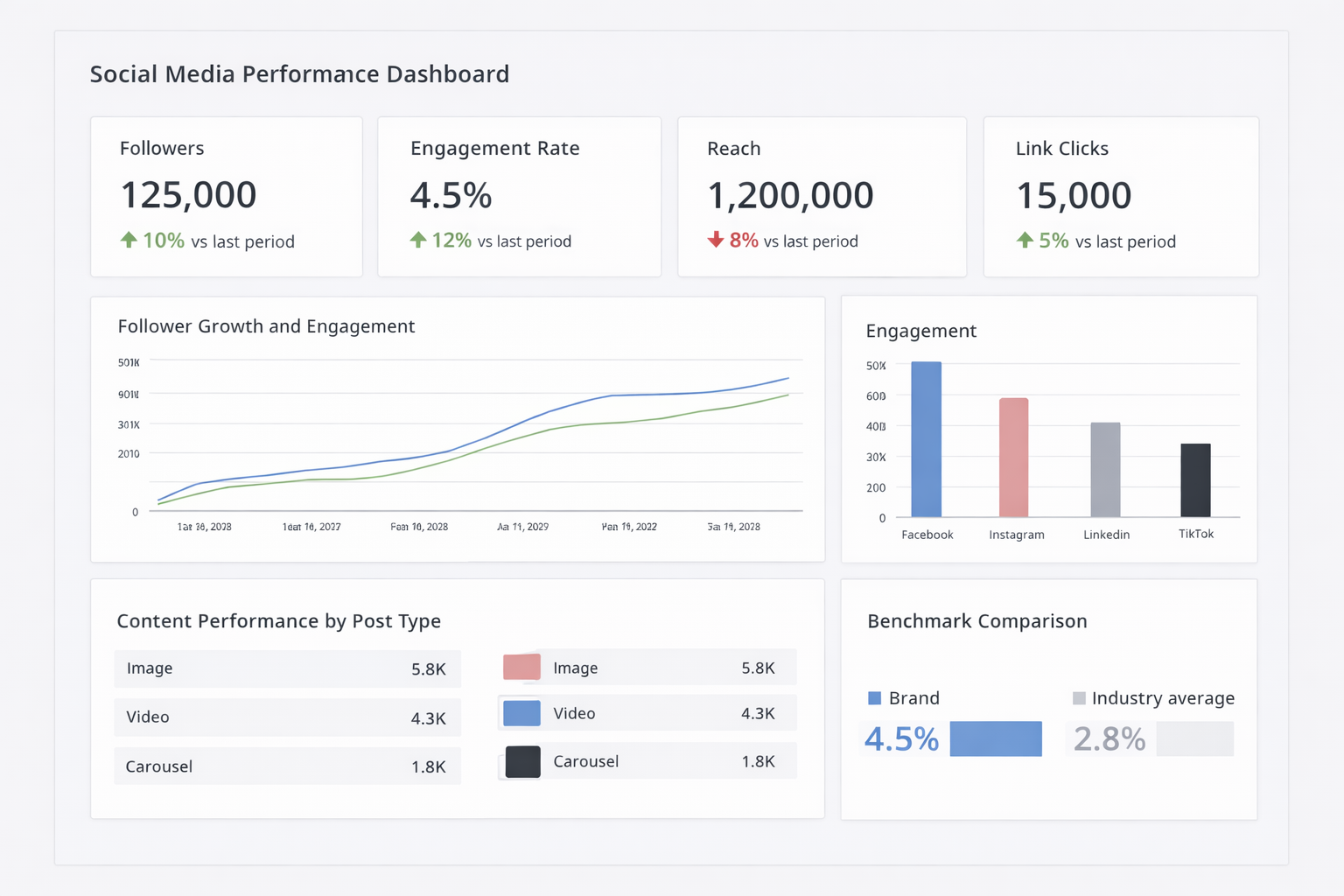
These dashboards reveal which content types engage users the most. They also show the best times to post. Many agencies use social media dashboards to show how social activity leads to link clicks, leads, or conversions, not just follower growth.
Tip: I recommend including competitor benchmarks whenever possible. Showing a client their engagement rate is 4.5% means more when they see the industry average is 2.8%.
3. PPC dashboard
Pay-per-click (PPC) dashboards track paid ads across Google Ads, Microsoft Ads, and social platforms. They track impressions, clicks, click-through rate, cost per click, conversions, and return on ad spend.
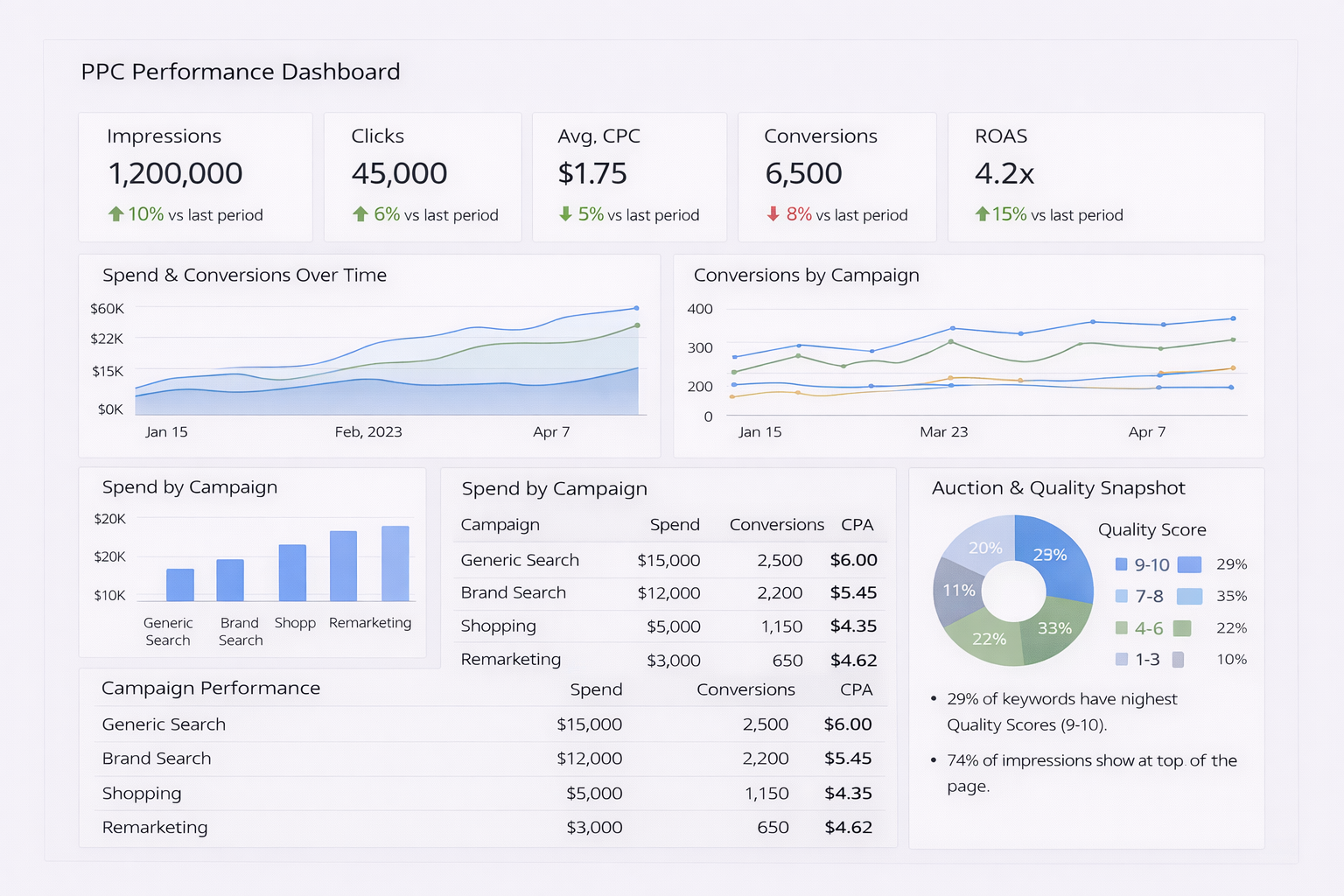
PPC dashboards typically break down performance by campaign and ad group, and many also show insights at the individual keyword level. You can spot which ads waste budget and which ones drive conversions. Quality scores and auction insights help you optimize bids.
4. SEO dashboard
SEO dashboards track organic search performance over time. Key metrics include organic traffic, keyword rankings, backlinks, domain authority, and conversions from organic search.
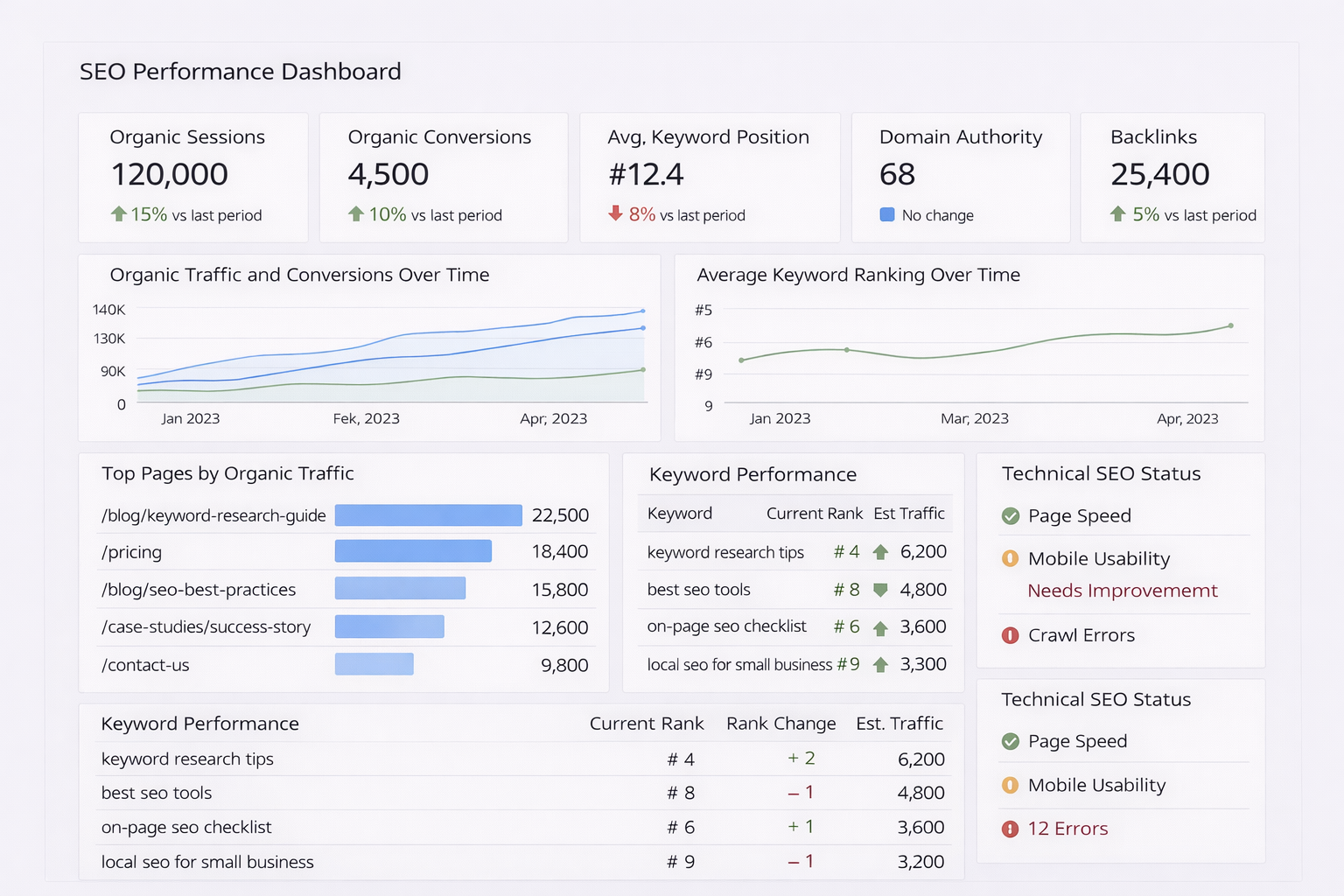
You'll see which keywords bring traffic and how rankings change month over month. You'll also see which pages perform best. SEO dashboards can also track technical issues like page speed, mobile usability, and crawl errors when connected to platforms like Google Search Console.
Client portal dashboard examples
Client portal dashboards focus on service delivery rather than analytics. These help consultants, accountants, and agencies manage client relationships. Here are some examples of client portal dashboards:
5. Project management dashboard
Project management dashboards show active projects, task completion, deadlines, team workload, and budget tracking. Clients see what's in progress, what's coming next, and where projects stand against timelines.
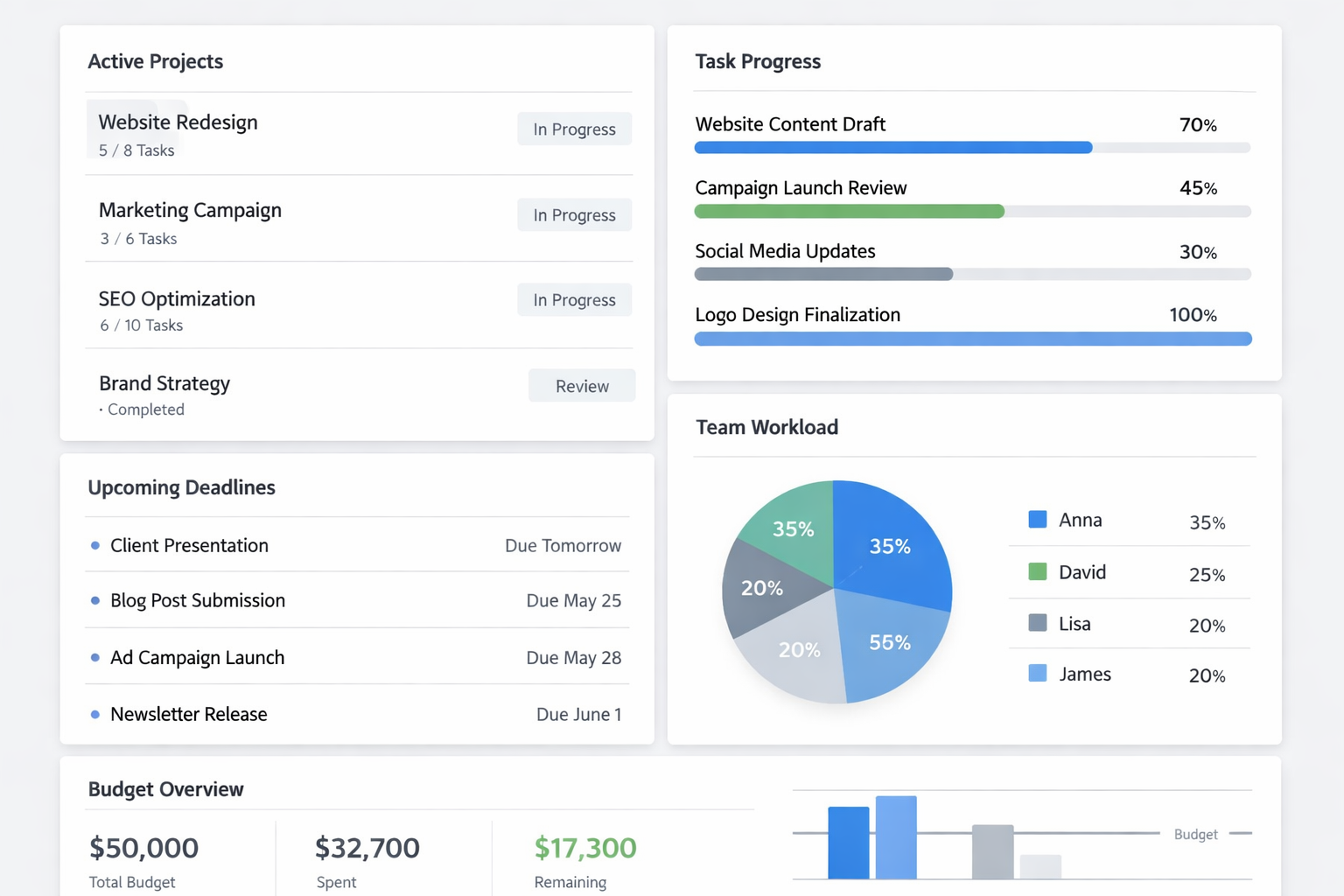
I recommend these for any service business juggling multiple client projects. Marketing agencies use them to track campaign launches and content calendars. The visibility can help reduce the need for check-in meetings because clients can log in anytime to check progress.
Tip: Keep task names client-friendly. Internal labels like "Q1-2025-ClientA-Phase2" mean nothing to clients. Use easy titles like "Brand guidelines review" or "Website content draft."
6. Consulting firm project dashboard
Consulting firms need dashboards that handle long-term engagements with multiple deliverables. These dashboards organize projects by phase, track deliverable status, share research documents, and manage proposal approvals.
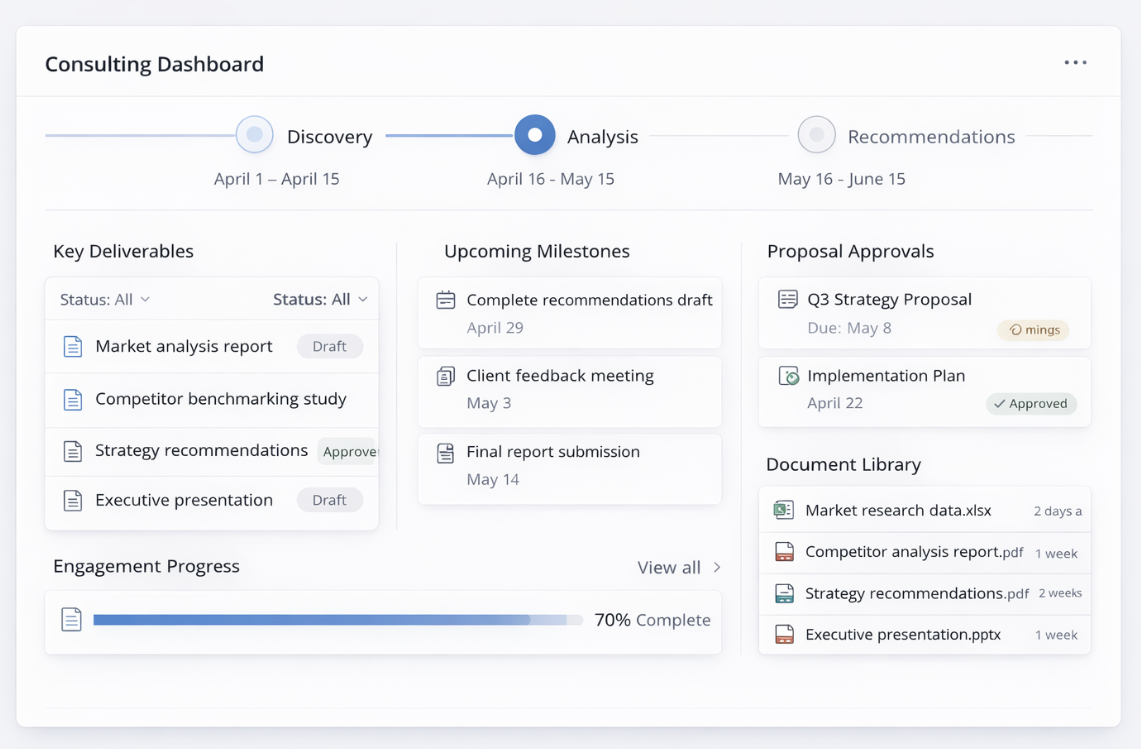
I've found consultants benefit most from combining project timelines with document libraries. Clients need to reference past reports, access current analysis, and see upcoming milestones without switching between tools. A good consulting dashboard puts all of that in one branded space.
7. Accounting firm client portal
Accountants and accounting firms use client portal dashboards to share tax documents, send invoice reminders, collect financial information, and update clients on filing deadlines. Security and compliance features are often more important here than in other industries.
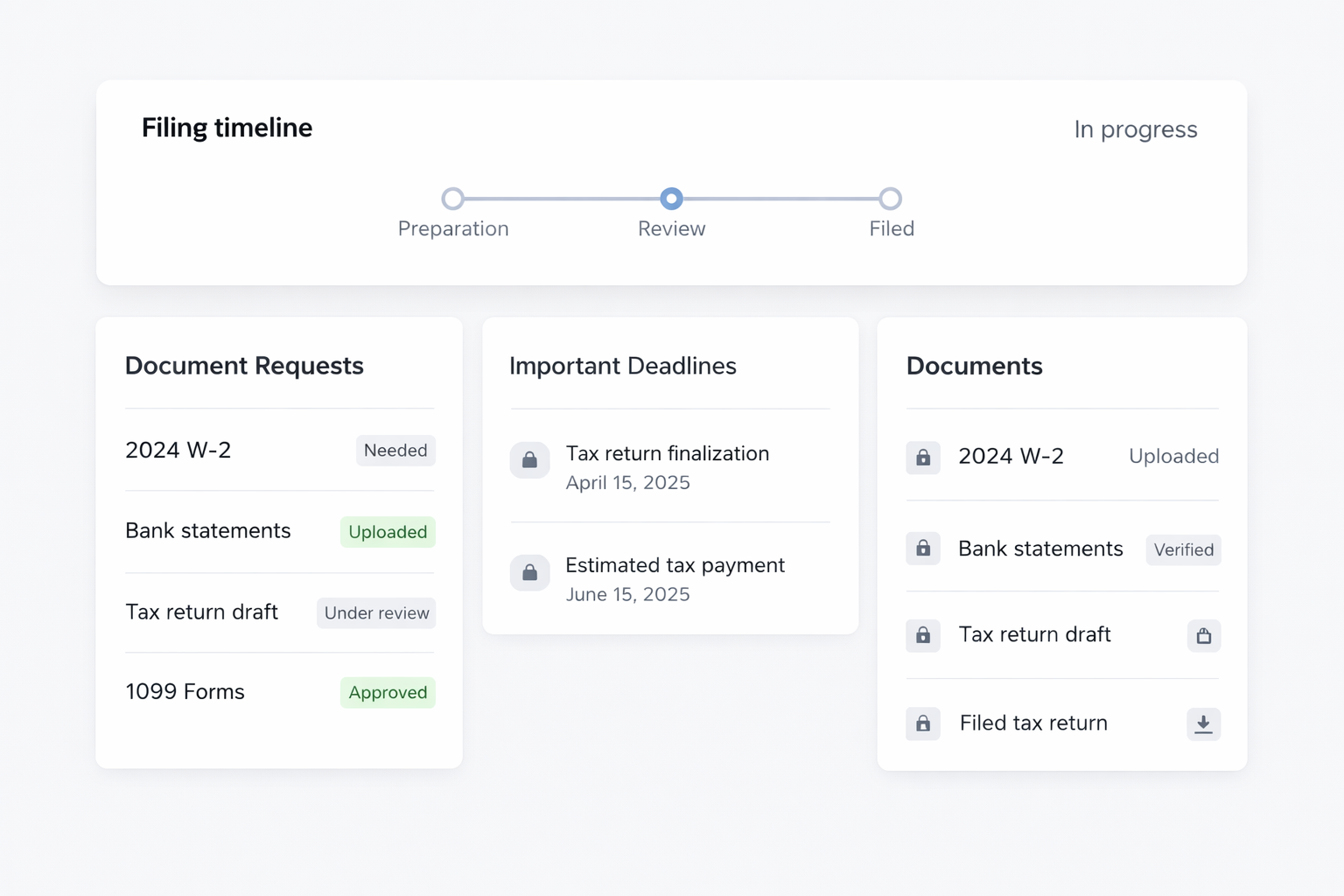
Accounting firm portals typically include secure file upload for sensitive documents like W-2s or bank statements. Clients can check the status of their tax return, see what information the firm still needs, and receive notifications when documents are ready to review.
8. Creative agency client portal
Marketing and creative agencies use client portals to share campaign assets, collect feedback, manage revisions, and invoice for completed work. These dashboards organize deliverables by project or campaign so clients can easily find what they need.
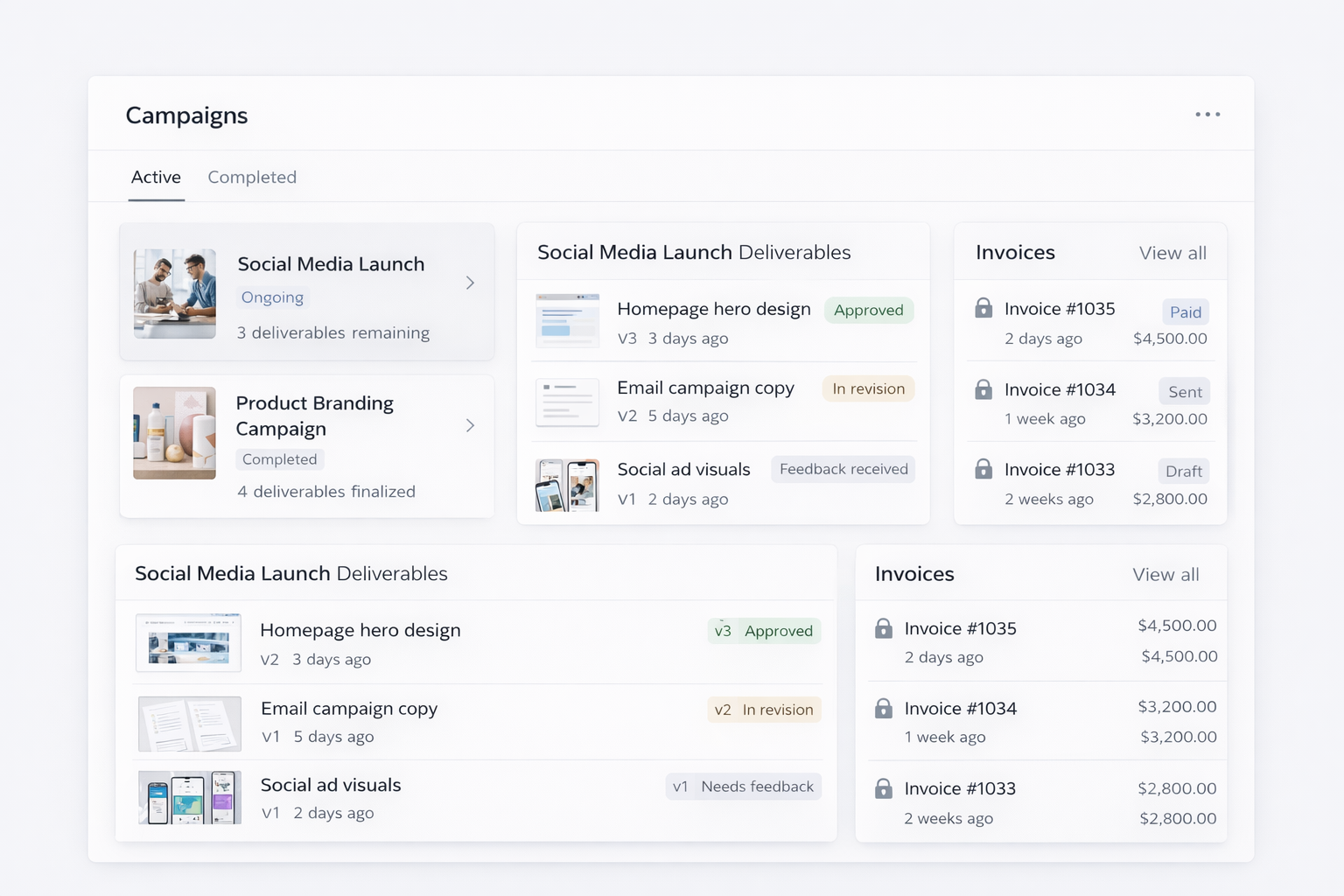
Tools like Assembly let you create a branded space where clients access everything related to their campaigns. The best agency portals combine project tracking, file sharing, messaging, and billing instead of making clients jump between multiple platforms.
Tip: Keep revision tracking clear. Clients should see version history, know which draft is current, and understand what feedback has been addressed.
9. Freelancer client portal
Freelancers use client portals to manage contracts, share deliverables, send invoices, and keep project communication organized. These portals help professionals like consultants, designers, and writers look more professional than relying on email and payment links.
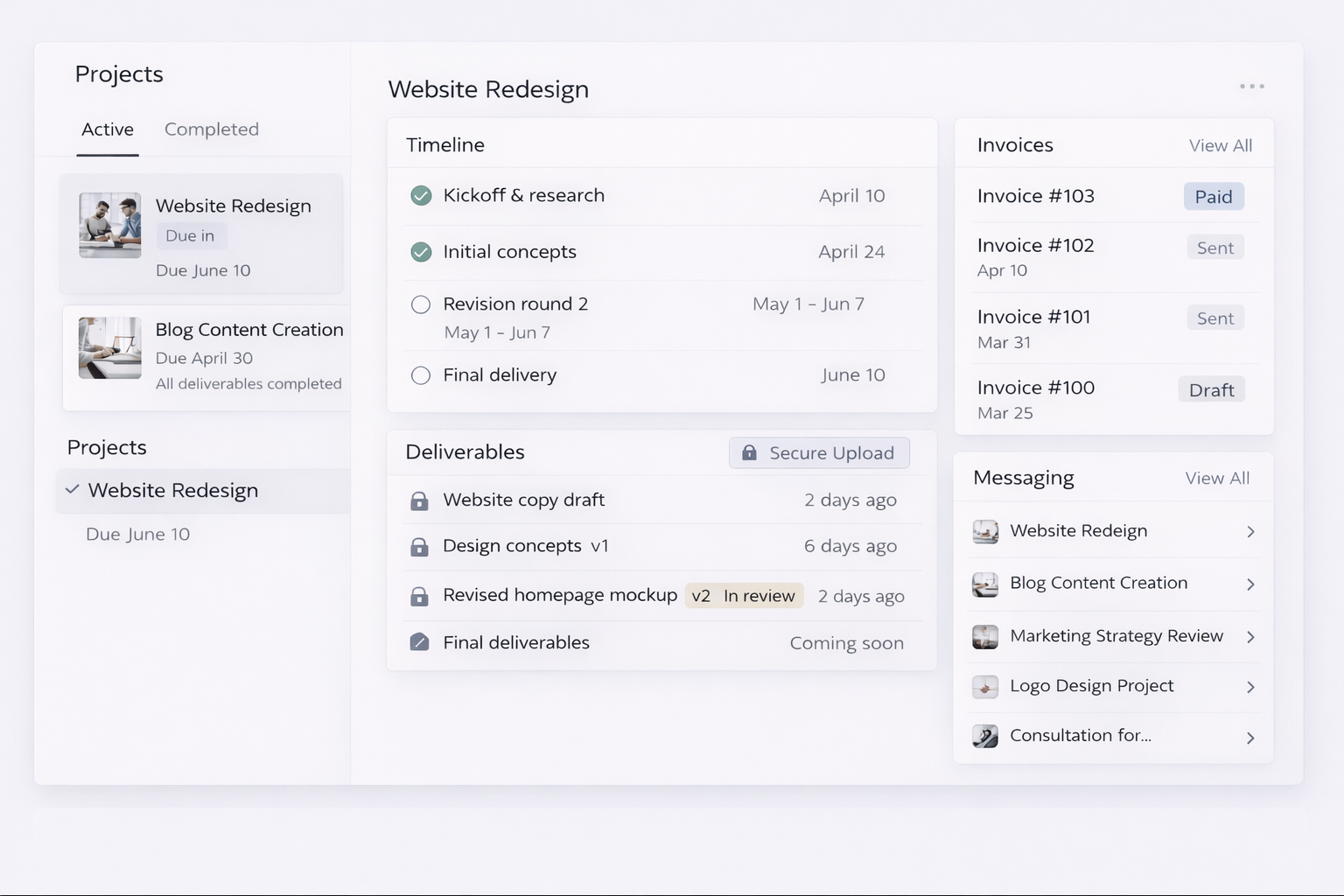
A simple freelancer portal includes project timelines, file sharing, invoice tracking, and a message thread for each client. This keeps everything in one place so clients aren't digging through email to find that contract from three months ago.
I've seen freelancers win clients specifically because they offer a portal. For many clients, a portal signals they’re working with a professional business, not a side project. Clients often appreciate having one login where they can check project status, download files, and pay invoices instead of managing 10 different tools and email threads.
Essential features for client dashboard software
The right dashboard software depends on what you need to track and who needs access. Here are key features to look for in both marketing dashboards and client portals:
- Data integration: Your dashboard should connect to the platforms you already use. Marketing dashboards need integrations with Google Analytics, ad platforms, and social media tools. Client portals should sync with your project management software, accounting system, and file storage. Manual data entry defeats the purpose of having a dashboard.
- Customization: You need control over what data displays and how it looks. Marketing dashboards should let you pick which metrics appear. It should also let you customize chart types. Client portals should allow branding with your logo and colors.
- User permissions: Client-facing dashboards need access controls. This is so each client only sees their own projects and data. Your team should see everything across all clients, but Client A shouldn't be able to access Client B's information. Look for granular permission controls that let you set access by user role or by specific project.
- Real-time updates: Dashboards should refresh automatically. I've worked with tools that need manual updates or only sync once daily. Near real-time data is particularly important for paid ads and time-sensitive projects where waiting costs money.
- Sharing capabilities: Clients need easy access without technical setup. The best dashboards offer simple sharing through a link or login credentials.
Best practices for client dashboards
A dashboard only works if clients can understand it, find what they need, and trust the data stays current. Here are some best practices to help you get started:
Focus on relevant metrics only
Pick the 5-10 numbers that directly relate to your client's goals. If a client cares about lead generation, show leads, conversion rates, and cost per lead. Skip vanity metrics like page views unless they tie to a specific objective.
I've seen dashboards with 30+ metrics that overwhelm clients instead of informing them. More data doesn't mean better insights. Choose metrics that answer the question "Are we hitting our goals?"
Customize for each client type
A dashboard for an accounting client looks nothing like one for a marketing agency. Accountants need tax deadlines, document status, and billing summaries. Agencies need campaign performance, deliverable tracking, and creative approvals.
Build templates for each client type, then customize within those templates. This saves time while still giving each client a dashboard that fits their specific needs.
Keep design clean and scannable
Use plenty of white space. Group related metrics together. Make important numbers bigger and bold. Clients should understand the dashboard's main takeaway within 10 seconds of opening it.
Avoid cluttered layouts with tiny text and competing color schemes. Clean design isn't about looking pretty. It's about making information easy to process quickly.
Provide context with annotations
Numbers without context confuse clients. If conversions dropped 15% last month, add a note explaining why. I add brief annotations to any significant changes. This reduces "what happened here?" questions that can waste time in meetings.
Update dashboards regularly
Set a consistent refresh schedule and stick to it. Stale data breaks trust. Automated updates work better than manual refreshes because they're reliable and don't depend on someone remembering to click a button.
Ready to create a branded client experience? Try Assembly
The client dashboard examples above show different ways to organize client data. The right platform can help you reduce tool switching and create a more professional impression and experience.
Assembly is a client portal software tool built on a core CRM with project management, messaging, and file sharing. Service businesses use it to create a branded space where clients access project updates, documents, and communication in one place.
Here’s what you can do with Assembly:
- Embed a custom dashboard or analytics platform: Assembly lets you embed custom-built dashboards from Looker Studio, Databox, and any major service provider that offers embedding, as well as create custom dashboard apps specific to your business.
- Track client details and activity: Manage client records, communication history, and relationship data in a structured CRM that keeps everything organized in one place.
- Give clients a branded portal: Clients log into a space that reflects your brand to access contracts, invoices, files, and project updates without email back-and-forth.
- Keep tasks, messages, and files together: Client communication, shared files, and project tasks stay connected to each client record instead of being scattered across separate tools.
- Prep faster for meetings: The AI Assistant summarizes recent client activity and communication, helping you walk into calls with a clear picture of what’s been discussed and what’s outstanding.
- Stay ahead of clients: Highlight patterns that may show churn risk or upsell potential, making outreach more timely and relevant.
- Cut down on admin: Automate repetitive jobs like reminders, status updates, or follow-up drafts that used to take hours. The Assistant handles the busywork so your team can focus on clients.
Ready to simplify how your firm manages client work? Start your free Assembly trial today.
Frequently asked questions
What's the difference between a client dashboard and a client portal?
A client dashboard shows data and metrics, while a client portal gives clients a full workspace to manage projects, files, and communication. Dashboards show information visually, while portals enable interaction and collaboration between you and your clients.
Which industries use client dashboards most?
Marketing agencies, consulting firms, accounting practices, and law firms use client dashboards frequently. These industries need to either report campaign performance data or manage ongoing client relationships with multiple projects and deliverables. Service businesses benefit more from portal-style dashboards while agencies tracking campaigns need analytics-focused tools.
Can I build a client dashboard without coding?
Yes, no-code platforms let you build dashboards without code by connecting data sources and choosing which metrics to display. You drag and drop elements, customize layouts, and set up automated data refreshes without writing any code. Many platforms offer templates you can customize instead of starting from scratch.