
7 Ways to use ChatGPT for accountants (and what not to do)
Using ChatGPT as an accountant can save time or create liability, depending on how you apply it. Learn 7 effective ways to use it and what to avoid in 2026.


ChatGPT can help accountants draft emails, research tax codes, and handle repetitive tasks. I tested it across accounting workflows and identified 7 practical applications that save time without compromising professional standards in 2026.
Disclaimer: The information in this article, including tax codes, compliance guidance, and software features, is subject to change. While we work to keep our content current and accurate, we recommend consulting official IRS sources, regulatory bodies, or qualified tax professionals for the most up-to-date and authoritative information before making important accounting decisions.
What is ChatGPT and how does it work for accounting?
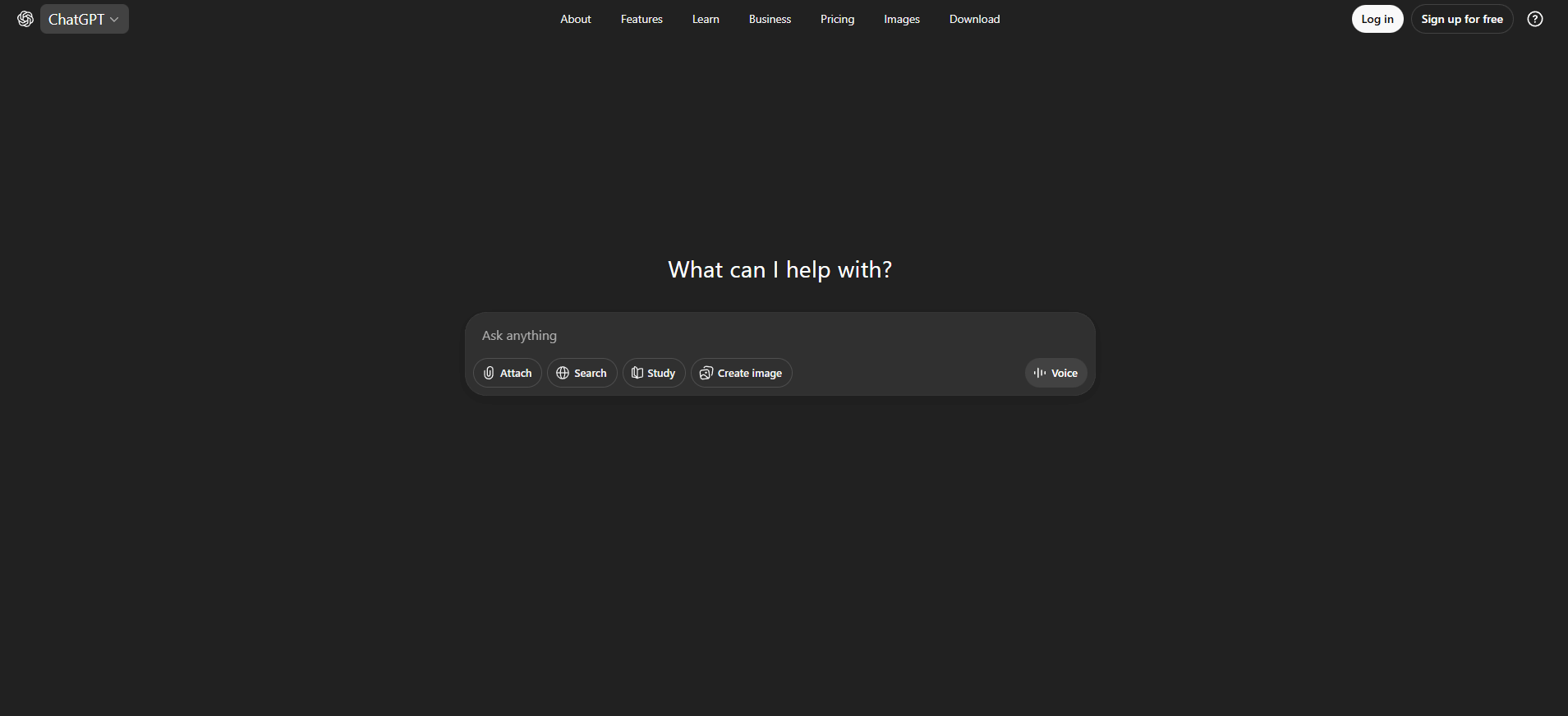
ChatGPT is an AI chatbot from OpenAI that uses natural language processing to answer questions, generate text, analyze data, and automate tasks. For accountants, it can function like a digital assistant that can help draft client emails, research tax codes, format spreadsheets, and categorize transactions based on the prompts you provide.
7 ways to use ChatGPT for accountants
ChatGPT won't replace your expertise, but it can handle the repetitive tasks that eat up your day. It works well as a research assistant for formatting spreadsheets or drafting client emails you've written a hundred times before.
The key is knowing which tasks to hand off and which ones still need your judgment. Here are seven safe and helpful uses for ChatGPT:
1. Simplify client communication and follow-ups
You can use ChatGPT to draft the type of client emails you write repeatedly, like tax deadline reminders, document request follow-ups, and status updates on returns in progress.
To get useful email drafts, start by giving ChatGPT context about your situation and the tone you want. The more specific you are upfront, the better the output.
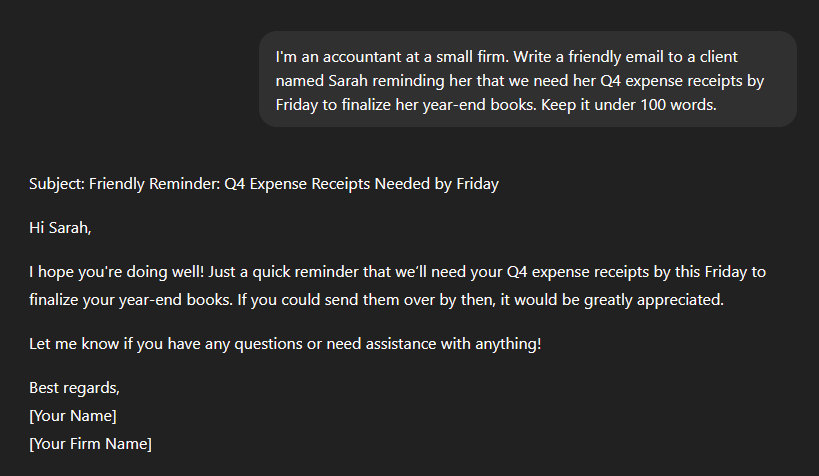
Here’s the example prompt to try: "Write a friendly email to a client named [name] reminding them that we need their [document or files] by [date and time]."
Check out how ChatGPT can structure a client email:
You can also use ChatGPT for:
- Summarizing long email threads: When a client forwards you 15 messages, paste the thread into ChatGPT and ask for a summary. You'll get the key points in three sentences instead of reading through the entire exchange.
- Connecting Gmail for inbox triage: ChatGPT Plus and Pro users can connect Gmail through the Apps feature to organize priorities, flag urgent requests, and surface action items from the last 30 days. Just remember not to connect accounts containing sensitive client data like SSNs, account numbers, or confidential financial details.
- Generating engagement letter templates: ChatGPT drafts templates for engagement letters and onboarding communications. I find this more efficient than starting from scratch, though you'll still need to customize rates and service details for your firm.
Important reminder: Read and edit everything ChatGPT generates before sending. It makes mistakes, and sometimes “hallucinates” when it confidently states incorrect information.
2. Turn PDFs into workable spreadsheets
One of the more practical uses of ChatGPT for accountants is converting financial data from PDFs into spreadsheets. Bank statements, transaction lists, and financial reports often come in PDF format that you can't easily work with.
Here are the steps to convert your PDFs into spreadsheets:
- Give ChatGPT your data: Copy the text from your PDF document and paste it into ChatGPT. Alternatively, upload your PDF file to ChatGPT.
- Send it your prompt: For example, "Here's a bank statement excerpt: [paste 3-5 transaction lines]. Convert this into a CSV format with columns for Date, Description, Amount, and Balance."
- Get your result: Once you give this prompt to ChatGPT, it will organize the data into a table you can copy directly into Excel or Google Sheets. For CSV files, ask ChatGPT to format the output as CSV, then save it as a .csv file.
Security warning: Never paste sensitive information like account numbers, SSNs, or EINs into ChatGPT. Strip out any personally identifiable information before using this feature. OpenAI may retain conversation data for security, abuse prevention, and legal purposes (even if you turn off training or history), so treat chats as non‑confidential.
3. Build Excel formulas without memorizing syntax
ChatGPT writes Excel formulas, creates pivot tables, and generates macros without you needing to remember complex syntax. I find this pretty useful when I need to use a formula I don't work with daily.
To get help with your spreadsheets, describe what you want to accomplish in plain English. ChatGPT will give you the exact formula.
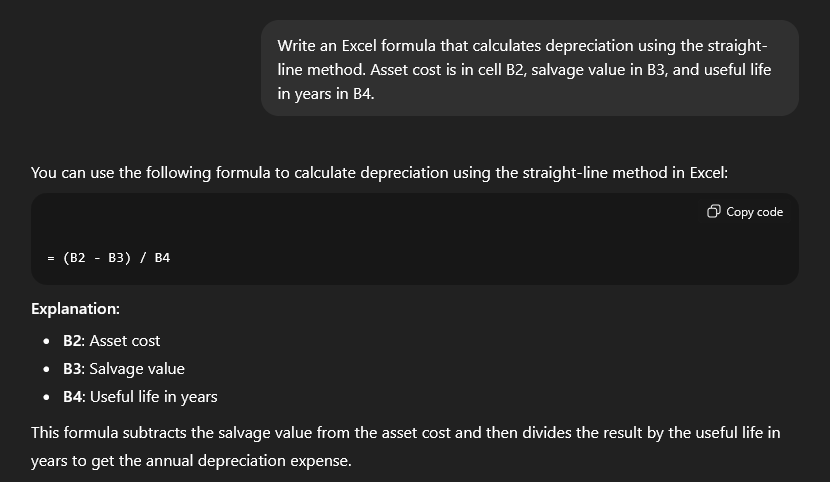
You can use an example prompt like: "Write an Excel formula that calculates depreciation using the straight-line method. Asset cost is in cell B2, salvage value in B3, and useful life in years in B4."
Check out how ChatGPT breaks down a depreciation formula:
For pivot tables, describe your data and what analysis you need. ChatGPT will walk you through the setup steps.
Here’s what ChatGPT can help you with:
- Basic formulas (VLOOKUP, IF statements, SUMIF)
- Macro creation for repetitive tasks
- Pivot table setup instructions
- Formula debugging when something isn't working
But keep in mind that ChatGPT doesn’t do too well with:
- Very complex nested formulas (requires multiple attempts)
- Formulas that depend on your specific data structure (needs context)
Here’s a tip: ChatGPT also explains formulas that other people wrote. If you inherit a spreadsheet with complex formulas you don't understand, paste the formula into ChatGPT and ask it to explain what each part does.
4. Identify unclear transactions and suggest categories
When you see ambiguous charges on bank statements, you can ask ChatGPT to identify the merchant and suggest accounting categories.
You can use an example prompt like: "I have a bank transaction that says 'SQ*COFFEE SHOP 123'. What type of business is this likely from and what accounting category would this fall under?"
Check out how ChatGPT breaks down a Square transaction:
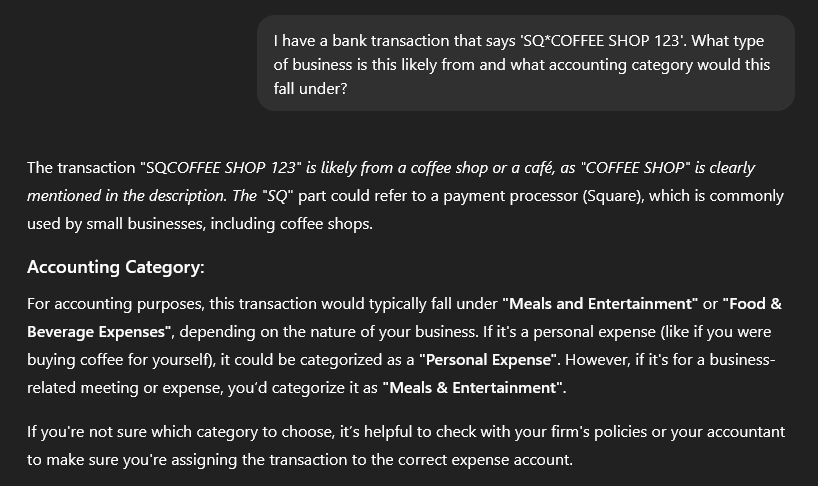
It’s important to remember that ChatGPT makes educated guesses. You still need to verify the merchant and confirm the category fits your client's business. I wouldn’t rely on it for final categorization without double-checking.
Here’s a tip: For a more structured approach, you can give ChatGPT a list of transactions and ask it to create a table with columns for Merchant Name, Confidence Level, Suggested Category, and Notes. This works well when you have 10-20 unclear transactions to research at once.
5. Break down complex tax concepts for clients
ChatGPT breaks down complex tax concepts into language your clients will understand. This helps when you need to draft client communications about tax changes or new deductions they might qualify for.
You can use an example prompt like: "Explain IRC Section 179 in simple terms for a small business owner who wants to know if they can deduct equipment purchases this year."
Check out how ChatGPT breaks down IRC Section 179 in plain English:
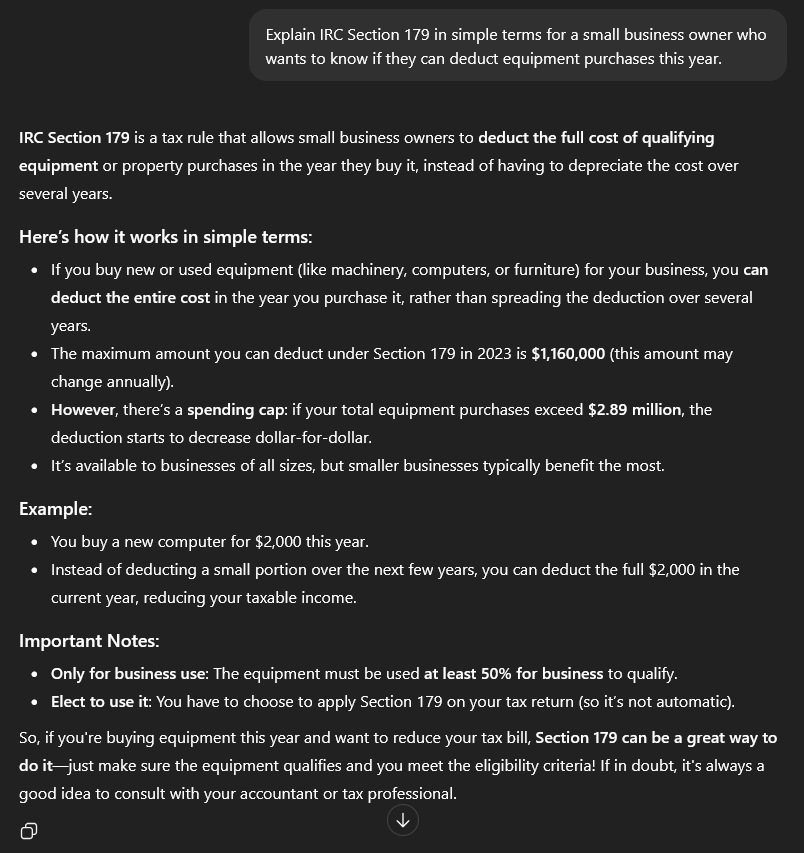
You can also use ChatGPT to summarize new legislation. Just paste in the relevant sections and ask for a clear explanation.
Important tip: Never rely on ChatGPT for final tax advice. Knowledge cutoff dates mean it might not know about recent changes. I recommend using it for initial research and explanations, then verifying with current IRS publications, tax software, or your own expertise.
6. Draft financial report narratives and variance explanations
ChatGPT can draft explanatory notes for financial reports and analyze variance between accounting periods.
You can use an example prompt like: "Revenue increased from $500K to $650K quarter over quarter, but net profit only increased from $50K to $55K. Draft a brief explanation for the board about why profit didn't increase proportionally."
Check out ChatGPT's explanation of why revenue growth didn't match profit growth:
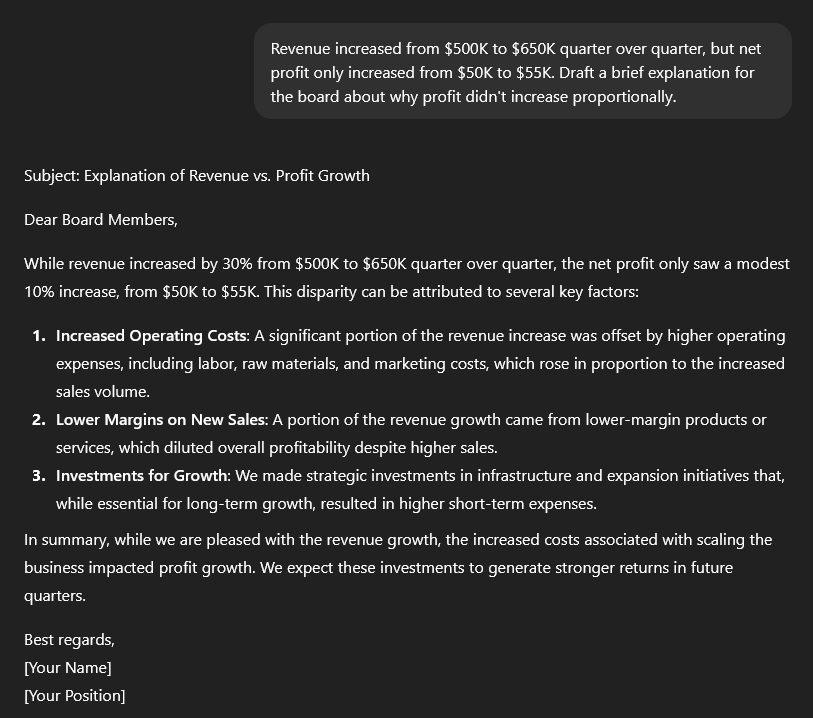
ChatGPT will provide an explanation you can include in reports or client communications. It might point out that increased revenue with flat profit margins suggests higher operating costs or reduced margins.
If you want to use ChatGPT for variance analysis, paste income statement data from two periods and ask it to identify the largest changes and what might have caused them. This gives you a starting point for deeper analysis.
Important tip: ChatGPT can't access your actual financial data o on its own. You need to provide the context and figures (without giving it sensitive information). It's drafting explanations, not performing financial analysis from raw data.
7. Document your processes and onboarding workflows
ChatGPT helps document your internal procedures and create client onboarding materials. Here’s how to document processes:
- Describe your current process to ChatGPT: Ask it to turn it into a checklist or standard operating procedure.
- Use this example prompt: "We onboard tax clients by collecting their prior year returns, creating a folder structure, sending a welcome email, and scheduling a kickoff call. Turn this into a detailed onboarding checklist for new team members."
- For client intake forms: Describe what information you need to collect and ChatGPT will draft the questions. You can ask it to organize questions by category (personal information, business details, tax situation) or create conditional questions based on client type.
ChatGPT will create a structured document with steps, timing, and what to include in each phase.
I use this approach for onboarding checklists, SOPs, and training materials. The output needs editing to match your firm's specific needs, but it beats staring at a blank document trying to remember every step in your process.
The best ChatGPT features for accounting firms in 2026
ChatGPT has added several features beyond the basic chat interface that are specifically useful for accounting work. These tools expand what you can do without needing to switch between multiple applications.
Here are the key features you might find useful:
- File uploads: This allows you to upload PDFs, spreadsheets, and documents directly instead of copying and pasting text. ChatGPT can read and analyze the content, making it easier to work with bank statements, financial reports, and tax documents.
- Web search: Use this to access current information beyond ChatGPT's training data. When you need recent tax law changes or current IRS guidance, a web search pulls information from the internet instead of relying on outdated training data.
- Agent mode: This feature allows ChatGPT to break down complex tasks into multiple steps, use web search autonomously, and execute multi-step workflows without needing to prompt it each time. I find this particularly useful for research-heavy tasks like comparing multiple tax code sections or analyzing compliance requirements across different jurisdictions.
- Code Interpreter: This feature allows you to run data analysis and create visualizations directly in ChatGPT. Upload a CSV of transactions and ask it to create charts, calculate totals, or identify patterns without opening Excel.
- Canvas (for document editing): Canvas is a side-by-side workspace where you can edit documents, reports, or emails while chatting with ChatGPT. I use this when drafting client communications or financial report narratives that need multiple revisions.
File uploads and web search are available on free ChatGPT accounts with limitations. Agent mode, Code Interpreter, and Canvas require a ChatGPT Plus subscription ($20/month).
Tip: There are also Custom GPTs for accounting. These are pre-built ChatGPT assistants designed for specific accounting tasks. I've tested Accounting GPT and Accountant GPT, which come with accounting-specific prompts and knowledge built in. Do your due diligence before relying on them for client work, since you're still responsible for accuracy and compliance with professional standards.
ChatGPT mistakes accountants should avoid
ChatGPT is helpful for specific tasks, but there are clear boundaries where it becomes unreliable or risky. I've seen these mistakes create problems for accounting firms, so here's what not to do:
- Don't input sensitive client information: ChatGPT stores conversation data on OpenAI's servers, even if you disable the training setting. Never paste client names, SSNs, EINs, account numbers, or any personally identifiable information. Strip out sensitive details before using ChatGPT, or you're creating a data security liability for your firm.
- Don't rely on outputs without verification: ChatGPT makes confident mistakes called "hallucinations" where it states incorrect information as fact. I've seen it cite non-existent tax code sections and invent case law that doesn't exist. You're responsible for the accuracy of your work, not ChatGPT. Always verify outputs before using them in client deliverables.
- Don't forget the knowledge cutoff limitations: ChatGPT's training data has cutoff dates that vary by model. Any tax law changes, IRS guidance, or regulatory updates after those dates won't be reflected in its responses. Use the web search feature to pull current information, or you risk giving clients outdated advice that could cost them money.
- Don't use it for complex financial statement preparation: ChatGPT can't replace accounting software or prepare GAAP-compliant financial statements. It doesn't maintain general ledgers, track transactions in real-time, or integrate with banks. Use it for drafting explanations and research, not for core accounting functions that require specialized software.
Will ChatGPT replace accountants?
No, ChatGPT won’t replace accountants. It automates repetitive tasks but can't replace the judgment, client relationships, and expertise that accountants provide. It works best as an assistant for research, communication, and preliminary analysis.
Tax codes are complex, business situations are nuanced, and client relationships require human understanding. ChatGPT handles the tedious parts so you can focus on advisory work, strategic planning, and building stronger client relationships.
But I do think that accounting firms that adopt AI tools for efficiency while maintaining human oversight will outperform those that resist technology (or those that blindly trust AI outputs).
Why modern accounting firms use Assembly
ChatGPT cannot ensure sensitive client data is secure unless you are willing to pay for an enterprise license. Assembly, with its secure AI assistant powered by ChatGPT, is a better alternative for accounting firms looking to integrate AI into their work.
Assembly is a branded client portal tool built for accounting firms that need one central place for client communication, document collection, billing, and project updates.
Here’s what you can get with Assembly:
- AI-powered meeting preparation: Our AI Assistant pulls information from client records, documents, and workspace activity to answer questions about specific clients. Ask about recent activity or uploaded documents and get quick answers without manually searching. This helps you prep for calls without digging through multiple tabs.
- Branded client experience: Clients log into a portal with your firm's logo and colors, not a generic email inbox. It positions you as a premium service, not just another accountant sending spreadsheets.
- Centralized document collection: The Files App lets clients upload tax documents, receipts, and statements directly to their portal. No more "Did you get my W-2?" emails or digging through attachments.
- Real-time project visibility: The Tasks App shows clients their return status without them needing to interrupt you. They see exactly where their project stands without sending another message.
- Integrated billing and payments: The Billing App handles invoices, payments, and subscription tracking in one place. It integrates with QuickBooks, so your accounting stays synchronized.
- Automated client onboarding: New clients complete intake forms, upload initial documents, and get oriented through your branded portal before you even have your first meeting.
- Multi-company client management: Handle clients with multiple business entities from one unified client record. This recently launched feature was specifically requested by accounting firms managing clients with LLCs, S-Corps, and partnerships under the same ownership.
Ready to deliver a better client experience? Start your free Assembly trial today.
Frequently asked questions
Can ChatGPT prepare tax returns?
No, ChatGPT cannot prepare accurate tax returns because it lacks current tax law updates, cannot access tax software, and makes errors that could trigger audits. Use dedicated tax preparation software like Drake, Lacerte, or ProSeries for actual return preparation, and verify any AI-generated tax research with current IRS publications before relying on it.
Can ChatGPT replace bookkeeping software like QuickBooks?
No, ChatGPT cannot replace QuickBooks or other accounting software because it doesn't maintain general ledgers, track transactions in real-time, or generate GAAP-compliant financial statements. ChatGPT cannot integrate with banks, process payroll, or manage accounts receivable and payable.
Does ChatGPT work offline?
No, ChatGPT requires an internet connection because it runs on OpenAI's cloud servers rather than locally on your computer. You cannot access ChatGPT, retrieve past conversations, or use any of its features without an active internet connection.